
How to create Calendars in GoHighLevel
“The key is not to prioritise what's on your schedule, but to schedule your priorities.” - Stephen Covey
How to create a calendar in GoHighLevel.
Here are the step by step instructions:
Go to the "Calendars" section, access "Calendar settings".
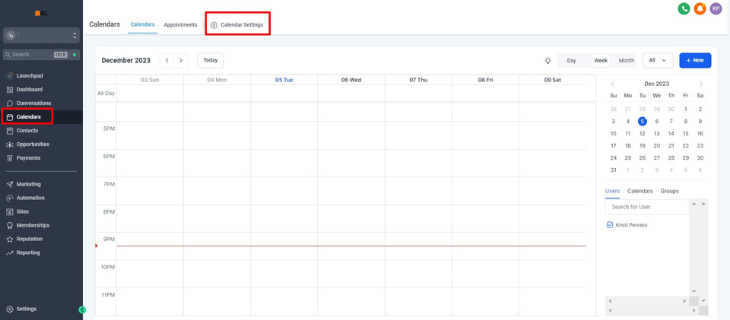
Start the calendar creation process by clicking on "Create calendar" located in the upper right corner of your screen.

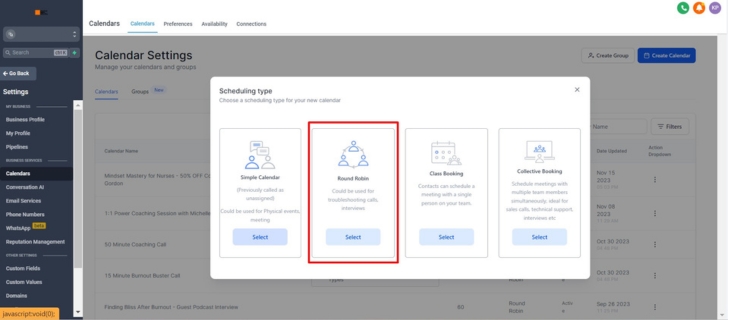
Select round robin.
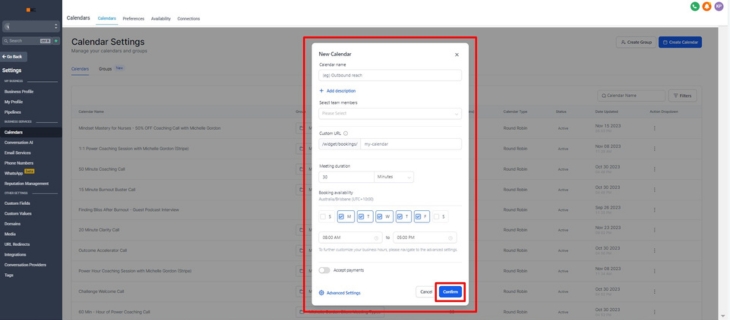
Fill in the required information: calendar name, team member, custom URL, meeting duration, and booking availability → click confirm
Search for the newly created calendar and edit.
For Meeting Details
Upload client logo. Make sure to use the circle widget shape of the logo.
Create a description for the calendar.
Group your calendar according to your preference.
CUSTOM URL: use a das( - ) instead of space
MEETING INVITE TITLE FORMAT: {{contact.name}} // [calendar name] with [client’s name] // [business name]
Appointment distribution is always the first option (Optimize for availability)
Select a team member and make it a high priority and select what platform the client will be using.
Choose any event color that will represent the calendar that is created.
For Availability
Select the standard as the availability type and make changes to the schedule according to the client’s availability. Details here are given by the client.
For Forms & Availability
Select DEFAULT form
Turn on the pre-populate fields and consent checkbox.
For the confirmation page, select the redirect URL. URL will be attached once the confirmation page of the backend funnel is set up.
Turn on the auto-confirm new calendar meetings.
Notifications & Additional Options
Check the 2 options: Allow google calendar to send invitation or update email to attendees, and Assign contacts to their respective calendar team members each time an appointment is booked.
Customizations
For the cancellation and reschedule: turn on the 2 options (allow reschedule meeting) and (allow canceling meeting).
Edit additional notes:
Hi {{contact.first_name}},
Thanks for booking [name of the calendar call]
Looking forward to our call!
Warmest,
[name of the client]
Check all details, spelling and grammar. Click save.
Ready to Meet Our GoHighLevel VA Service?
Experience the ease and effectiveness of digital marketing done for you with King Pixel's GoHighLevel VA service. We promise a seamless integration of your promotional ideas into impactful, tangible marketing solutions, all skilfully created within the robust framework of System King Pixel.
Entrust us with your day-to-day digital marketing needs, freeing you to focus entirely on growing your business and doing what you do best.
Book your discovery call and unpack our GoHighLevel VA service monthly packages.


